

Virtually every modern applicant tracking system (ATS) reads a two-column resume correctly. The words come through intact in test after test, regardless of layout. The opposite claim has circulated as career advice for years, usually without any real test behind it, so we decided to find out for ourselves.
The fear stems from something real: the words can come back in the wrong order. Not missing, just scrambled, sometimes mid-sentence. That's the actual mechanism behind the myth, and it comes down to which specific tool does the reading.
To address this properly, we ran what we believe is the largest controlled test of this question anywhere, including in the academic literature, then went further. We checked what people actually build and finish. Then we tested how AI models handle the same damage and looked at what the rest of the hiring industry uses to read resumes today.
Here's what 357 controlled tests, 19 million resume downloads, and a comparison against four AI models actually showed.

Key takeaways
- Two-column resumes lose almost no text during extraction in every test we ran, so the core myth doesn't hold up.
- The real risk is scrambled reading order, and it only shows up under one specific, older extraction method.
- Two-thirds of resumes built on Enhancv are already double-column, including the single most popular template in the product.
- AI-based parsing repairs almost all the extraction issues, except for one specific field—employer names.
- The most common causes of automatic resume rejection have nothing to do with column layout at all.
The two-column warning is folklore from the rules-based parsing era. What actually breaks machines today is text trapped in images, icons used instead of headings, and contact details hidden in the header.
Florian Koenen, Managing Director, TOPOS Personalberatung
The experiment: same resume, 17 templates, seven readers
We rendered one resume through all 17 Enhancv templates, using the real production system that builds every resume on the platform. The words never changed—only the layout did.
Then we ran each version through seven different pieces of extraction software—the actual tools real-world systems use to pull text out of a PDF. Each one takes the same file and hands back what it thinks the resume says. As you'll see, they don't all agree.
We didn't just test one resume because one document can hide a lot. A short resume and a packed one with six jobs put very different pressure on a layout.
So we tested three kinds: a long, detailed one, a typical resume with three jobs, and a dense one with six. Only once all three showed the same pattern did we trust the result.
Every test was checked against the original resume data, the exact words the PDF was built from. That way, we always knew exactly what should come back out. If something didn't match, that gap was real, not a guess.
And since the content never changed between tests, only the layout did, any difference we saw could only be caused by one thing—the layout itself.
Three ways software reads a page
Software doesn't read a PDF just one way. We found three distinct approaches among our seven tools, and they behave completely differently from each other.
- Geometry-sorted: reads strictly by position on the page, left to right, top to bottom, blind to column boundaries. Picture reading a two-column newspaper by moving your eyes straight across both columns instead of finishing the left one first. This is the method Enhancv's own resume importer uses today, and it's also the default or only mode in several widely used open-source PDF libraries. (To be clear, this describes how the underlying technology behaves, not a claim that your information gets lost or damaged.)
- Reading-order analysis: groups text into blocks first, then decides reading order, closer to how a person naturally scans a two-column page.
- Content-stream order: reads text in the exact order it was originally drawn into the file. Because most design tools finish one column before starting the next, this method usually preserves column order by accident.
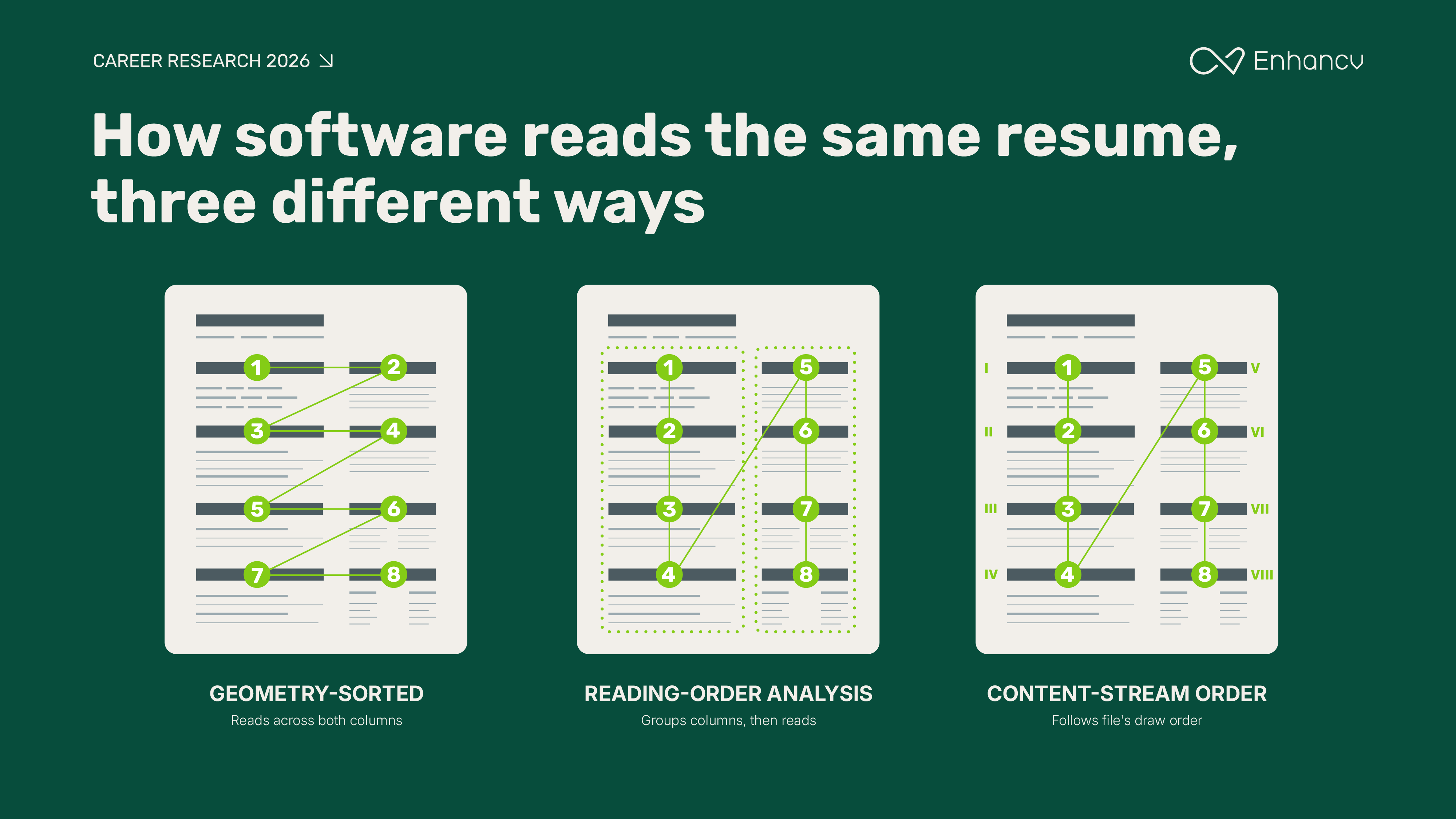
Run the same document through all three, and each one gives you something different. That single factor—which method is doing the reading—mattered more than anything else we tested.
What ‘getting it wrong’ looks like
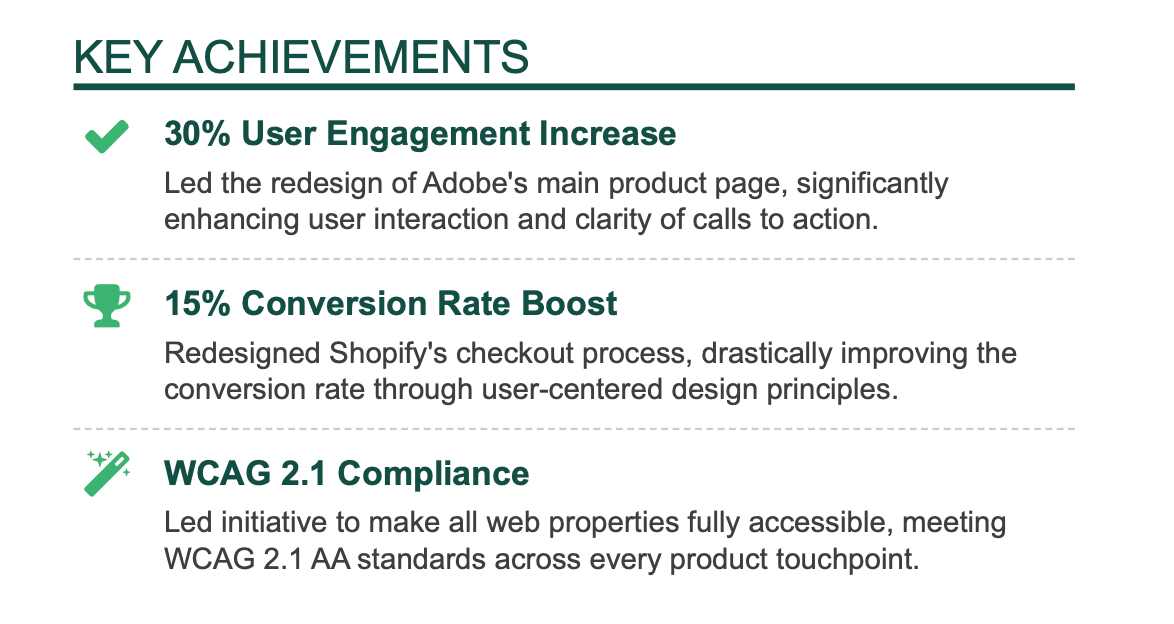
Take one real bullet point. In a single-column layout, it comes back exactly as written.
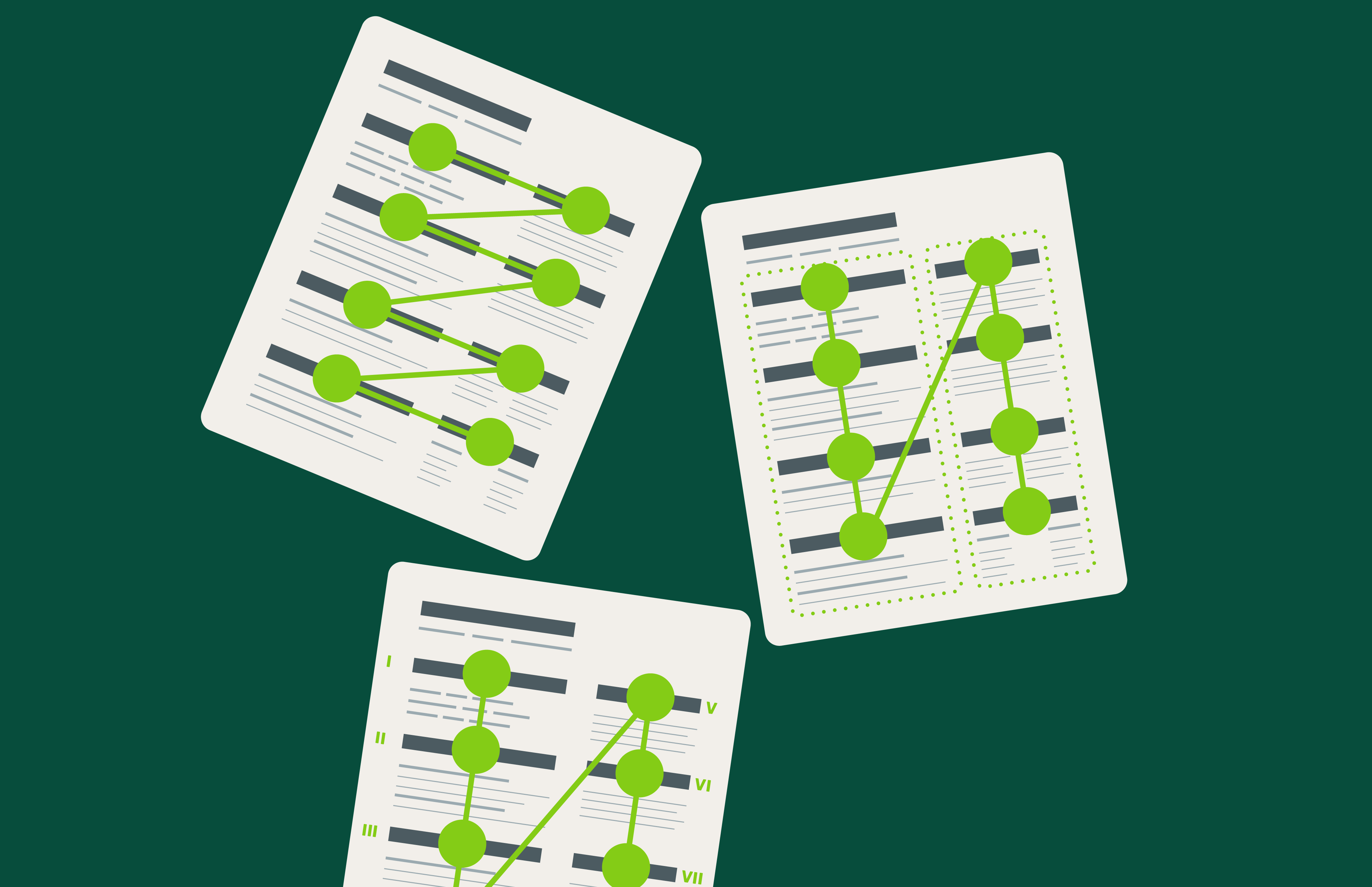
In a two-column resume, read by one specific type of tool, something stranger happens. The software reads straight across the page instead of down one column. It grabs a fragment from one column, then an unrelated fragment from the column beside it, and stitches them together mid-sentence.
What you see:
What pdftotext-layout reads:
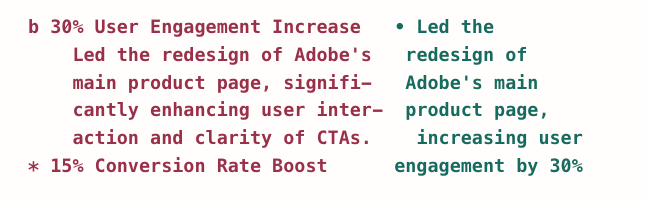
Nothing is missing. Every word from both columns is still there. A simple word-count check would score this a perfect 100%. Only a tool that reads line by line reveals the real problem.

The one real exception
Out of the 357 tests we ran, “Contemporary” was our only template where the tool failed to recover the candidate's name correctly. It’s the only one without a full-width header, so contact details sit in a narrow side column while the candidate's name sits in the wide column.
However, many job applications ask candidates to type their name into a separate form field, rather than relying on what gets parsed. So this rarely translates into a real-world problem.
The words survive. The order doesn't.
Across every test, total word recovery barely moved between one column and two, never more than half a percentage point apart, regardless of the tool. Email, location, phone number, and portfolio link came through correctly in all 357 runs.
Structure is a different story. Under the worst-performing extraction method, a resume's sections stayed intact only 35% of the time with two columns, down from 60% with one. That's a 24-point drop, and it's the real cost of a second column.
Switch to a different, increasingly common extraction method, and that same drop nearly disappears, down to about one point.
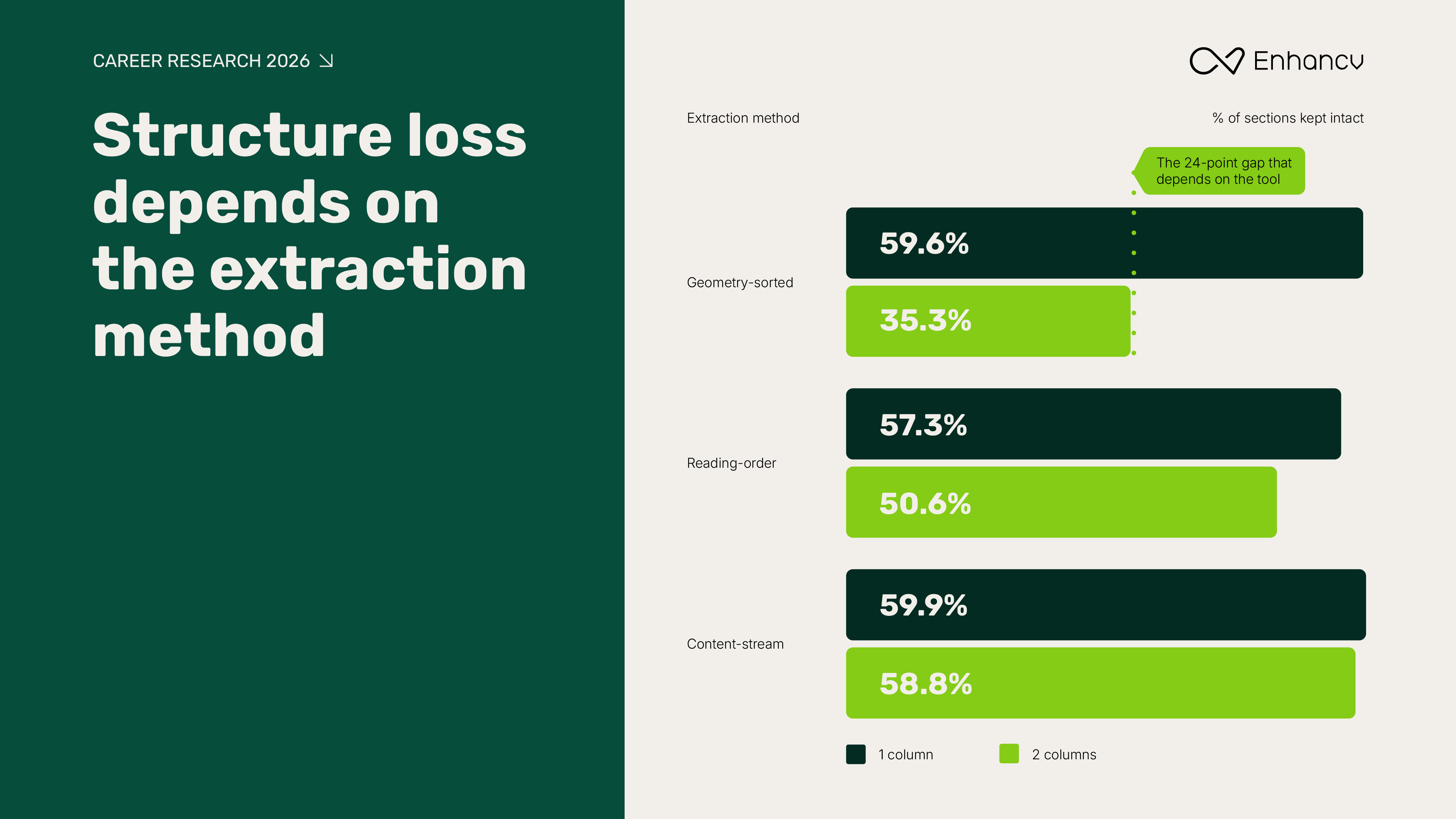
Whether a two-column resume "fails" isn't a property of the resume. It depends on whichever tool happens to be reading it.
Titles from one section merging with dates in the next section or a bulleted list that is split into sections and reordered… When this happens, I lose trust in the ATS and, without hesitation, open the resume file. I always read resumes in the format a human would to validate a parsed resume.
Devin Hornick, Co-Founder, KORE1
Does this narrow risk show up in how people use the builder?
The test result is reassuring, but it raises a different kind of question, not about hiring risk, but about the resume builder itself. If two columns are this technically safe, are they still harder to actually build, download, and finish? That's a question about product experience, not about what happens once a resume reaches an ATS or a recruiter.
We looked at what people build and whether the format holds them back.
Two out of three resumes downloaded on Enhancv use a multi-column layout, and the single most popular template in the product, “Double Column,” is a two-column design.
That share has ticked down slightly since 2023. It's tempting to read that as people quietly rejecting two columns. The data says otherwise: 94% of that shift traces back to one single-column template we happened to move higher in our own template picker in 2024. Two-column downloads barely moved.

Is a two-column layout harder to actually finish?
At first glance, yes, dramatically: 55% of single-column resumes people started ended up downloaded, compared to just 35% of multi-column ones.
That gap collapses once you account for one thing: “Double Column” is the automatic starting point for every new resume, so it silently absorbs every abandoned, half-started document. Once deliberately chosen two-column templates are compared on their own terms, the real gap is about three percentage points, not 20. That gap is about how easy the format is to work with in the builder—not about anything else.
It says nothing about what happens to the resume afterward, in an ATS or in front of a recruiter.
But none of this settles the real question this piece opened with. The extraction test already answered whether a two-column resume gets read correctly. Download numbers never could.
Does AI parsing already make this a non-issue?
So far, every number in this piece describes what happens before a human or a hiring system ever sees the resume. But there's one more step most resumes now pass through—an AI model reading the extracted text and turning it into structured fields. That step could go two ways: it might carry over the same interleaving problem, or it might fix it. We tested which.
We fed the same resume content to an AI model two ways: cleanly extracted from a single-column layout and read through the exact interleaving pattern that caused the most trouble in our earlier tests.
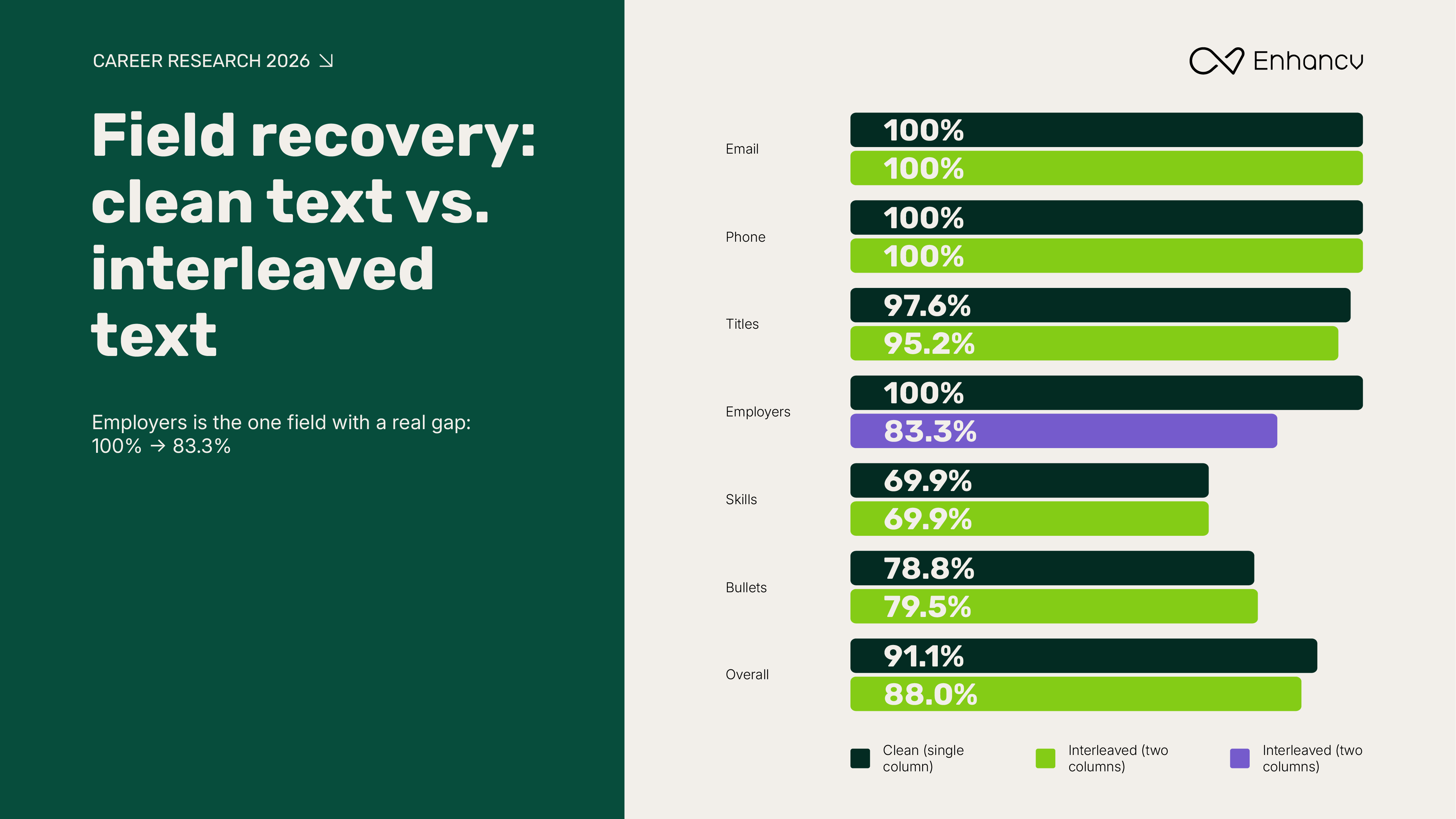
The result: almost all of that problem gets fixed. The 24-point structural loss from extraction shrinks to about three points once an AI model reads the text. Email and phone came back perfectly, every time.
One field doesn't fully recover. Employer names drop from 100% to 83%, consistently, because interleaving separates a job title from the company it belongs to. This isn't a formatting mistake on the writer's part. The confusion happens downstream, in how a two-column layout gets extracted and reassembled, and there's no tweak to how you write it that reliably prevents that.
There's no formatting workaround here, because the cause isn't in your control. What is in your control is column count. If accurate employer attribution matters most to you—say, you're counting on a recruiter to search resumes by company—a single-column layout is the one change that removes this specific risk entirely.
For most people, this narrow gap is a reasonable trade-off for a two-column design. For that one specific case, it's worth knowing which lever works.
Our take
Is the rest of the industry using AI to parse resumes?
Everything so far describes our own product. So we asked a bigger question: is this something unique to us, or true of the industry at large? To find out, we looked at the legal paperwork companies must file naming every outside vendor that touches a candidate's data. Those filings have to be accurate, so they're a far more honest paper trail than any product page.
The short answer: AI-based parsing exists, but almost nobody has turned it on. Both of the two largest parsing vendors added an AI-powered option in 2024, priced and activated separately from their existing engine rather than built in as a replacement for it (Textkernel's own announcement describes it as an optional, per-request feature).
Both also quietly fall back to the older parser if the AI version takes too long to respond. Their developer documentation confirms something worth flagging: the add-on fee still applies even when that fallback happens, so a customer can pay for AI parsing and end up with the standard parser's output anyway.
No applicant tracking company has publicly confirmed using that AI option as its default. For most resumes submitted today, the system doing the reading is still the older, pre-AI kind.
We could also confirm which parsing vendor sits behind several well-known platforms, a detail almost never stated on the platforms' own marketing pages:
Read this information for what it shows, and no further. It tells you who built the parsing engine behind each platform, and that most of them are still running older technology. It doesn’t tell you, because nobody has publicly tested it, how well any one of these specifically handles a two-column resume. That test doesn't exist anywhere, for any named platform.
Ours is the closest thing to it, and even ours tests the extraction methods themselves, not any single company's finished product. That's still the same mechanism this piece is about: not which company built the parser, but which of the three reading methods it uses.
The ‘old, neglected ATS’ story is only half true
It's tempting to picture this software as neglected across the board. Large employers actually run applicant tracking platforms that update constantly and automatically—some push mandatory updates to thousands of companies at once, several times a year.
What's genuinely stale sits one layer deeper—the parsing engine plugged into that platform. No vendor publishes a changelog for how resume parsing changes over time, so even a company running a constantly updated platform can have parsing logic that hasn't meaningfully changed in years.
Modern systems handle two columns better than the myth suggests, but the more interesting question is why we've built a hiring process where a formatting decision can quietly end someone's candidacy before another human ever sees them. That's the real problem worth fixing, not the column count.
Grady Gardner, GM & CRO, Braintrust
Does AI fix this industry-wide?
The evidence says extraction is still the real bottleneck. Two outside findings back this up.
One 2025 academic study found that about one in five resumes uses a layout complex enough to break normal reading order. Fixing the extraction step, before an AI model ever saw the text, produced the single largest accuracy gain in the whole pipeline.
A separate 2026 benchmark of document-parsing tools found three of four commercial parsers still struggling with multi-column pages, for the same reasons we found: incorrect column detection and reading order, not missing text.
One major parsing vendor even disclosed this about its own older system: it correctly read the layout of only 62% of well-formatted resumes, a number that jumped to 90% after an internal upgrade. Read plainly, a meaningful share of resumes running through systems still in use today were never being read in the right order to begin with, regardless of how many columns they had.
A parsing failure doesn't mean rejection
A resume that fails to parse correctly is not the same thing as a resume that gets rejected. Greenhouse's own support documentation confirms that when parsing fails, the resume is still attached to the candidate's file. Someone just enters the details by hand instead of it happening automatically. That's a loss of convenience, not an automatic rejection.
The best-documented real cause of automatic resume rejection has nothing to do with layout at all. Harvard Business School and Accenture's research found that close to half of employers automatically screen out resumes with an employment gap over six months.
Our own smaller survey of 25 U.S. recruiters points in the same direction: when asked what actually triggers automatic rejection, they most often named two things—an ATS explicitly configured to disqualify candidates for specific criteria and resumes missing specific keywords.
A parsing issue on its own doesn't prevent a candidate from advancing. How we handle this depends on the situation, but generally a recruiter will review the original document and manually correct the information in the system.
Jon Hill, Chairman & CEO, The Energists
Nothing in our data, or anyone else's, supports the idea that two columns cost someone the job.
So, is a two-column resume safe to use?
Yes. In every test we ran, the words came through intact, regardless of layout. The real worry—whether they come back in the right order—depends on one specific, aging extraction method, not on the columns themselves. That risk mostly disappears once an AI model reads the text, even though most systems today still don't have that upgrade yet.
One detail is worth knowing, but it's genuinely niche—employer names can occasionally get separated from job titles. This only matters if a recruiter is specifically searching resumes by company name, but most hiring never works that way. If it does describe your situation, a single-column layout removes the risk entirely. For almost everyone else, it's not worth a second thought.
What actually gets a resume rejected, like a big employment gap or a missing keyword, has nothing to do with how many columns it has. Format your resume for the reader in front of you, not for a decade-old fear about the software behind them.
When a candidate sends a resume that doesn’t parse correctly, they’re asking the recruiter to work harder to understand what they’ve done. Format your resume so we can read it. If the ATS can read it, we will see your experience.
Angie Politte, Director of Operations & Recruiting, Ozark Motor Lines
Methodology
This piece draws on five internal tests, summarized here.
Extraction test
Three resumes—a synthetic 14-section document, a realistic three-role resume, and a dense six-role resume—rendered through all 17 Enhancv templates using the production PDF pipeline, then extracted using seven library and mode combinations across three extraction families:
- Geometry-sorted (pdftotext -layout, PyMuPDF sorted),
- Reading-order analysis (pdftotext default, pdfminer.six),
- Content-stream order (pdftotext -raw, PyMuPDF unsorted, pypdf).
357 total runs. Every result was scored against one truth: the exact resume data each PDF was built from. A validity check ruled out content-clipping artifacts by confirming extracted character counts stayed within a tight, consistent range (1.024x to 1.068x) across every included run.
Download and completion data
19,413,503 resume downloads over 39 months. Completion analysis drawn from 5,083,300 resumes created over 12 months, excluding cover letters, templates, and duplicates, with a download treated as the completion signal.
AI parsing test
Ten real, anonymized customer resume uploads (names, emails, phone numbers, and URLs replaced with equal-length stand-ins before processing), run through four large language models—Claude Haiku 4.5, DeepSeek-V3.1, Qwen3-32B, and GPT-OSS 120B—then cross-referenced against the extraction test's damaged output to measure end-to-end field recovery.
Industry literature review
Seven parallel literature reviews covering 250 sourced claims, checked against primary sources: vendor documentation, the subprocessor disclosures companies file under GDPR, and the academic papers cited above. Full source list available on request.
Limits
This study measures text extraction accuracy, not hiring outcomes. No data here shows that any resume layout costs or wins an interview. The AI parsing test used a small sample of ten resumes, so its results are directional rather than exhaustive.
About Enhancv
Enhancv is a global AI Resume Builder that helps job seekers create modern, recruiter-approved resumes and cover letters. The company combines career data, user insights, and expert guidance to make job applications more effective and human.
Make one that's truly you.