Every job seeker eventually asks the same frustrating question: "Is there a resume builder that really lets me download a PDF for free?" Usually, one of the top answers is Novorésumé.
It’s built a massive reputation as the budget-friendly option in a field full of paywalls. But in a competitive job market, saving $20 isn't the ultimate goal—getting the interview is.
Does Novorésumé’s free tier offer enough firepower to impress a recruiter, or is it just a "good enough" solution for students?
We stress-tested the tool with a senior-level career profile to see if "free" comes at the cost of functionality.

Novorésumé key features
- Novorésumé is an excellent choice for students and entry-level applicants who need a clean, standard one-page resume that’s “impossible to break."
- The safety-first design philosophy restricts customization, making it difficult for senior professionals to adjust layouts or optimize space for longer careers.
- While you can download a high-quality PDF for free, you’re strictly limited to one page and cannot download a matching cover letter without paying.
- The Content Optimizer acts as a helpful checklist for finding errors, but the AI tools serve more as educational guides than automated writers.
- Unlike many competitors, Novorésumé avoids hidden subscriptions or recurring traps, though the premium cost is higher than average for a "do-it-yourself" builder.
Novorésumé onboarding
The process begins simply: you choose a template, decide whether to upload a PDF or create from scratch, and select your experience level.
This last step is critical. Novorésumé uses your experience level (e.g., Student vs. Senior) to lock you into a default set of sections and layout.
For example, selecting "Student" automatically places Education at the top and restricts the layout to one page. While helpful for beginners, this means you’re working with a pre-fixed template rather than a flexible canvas from the start.
As a Certified Professional Resume Writer (CPRW), I’ve crafted hundreds of resumes. Over the years, I’ve become conditioned to expect certain workflows—I know exactly where I want a certain section to sit.
My reaction to Novorésumé’s basic tool was a bit confusing. It fought my instincts. I immediately wanted to test a single-column layout to see if it would handle 15+ years of experience better than the default two-column grid.
But the tool forced me into its own logic, blocking the standard adjustments I usually make in seconds. If a professional writer feels restricted, a first-time user might just feel stuck.
Author’s take
Novorésumé templates review
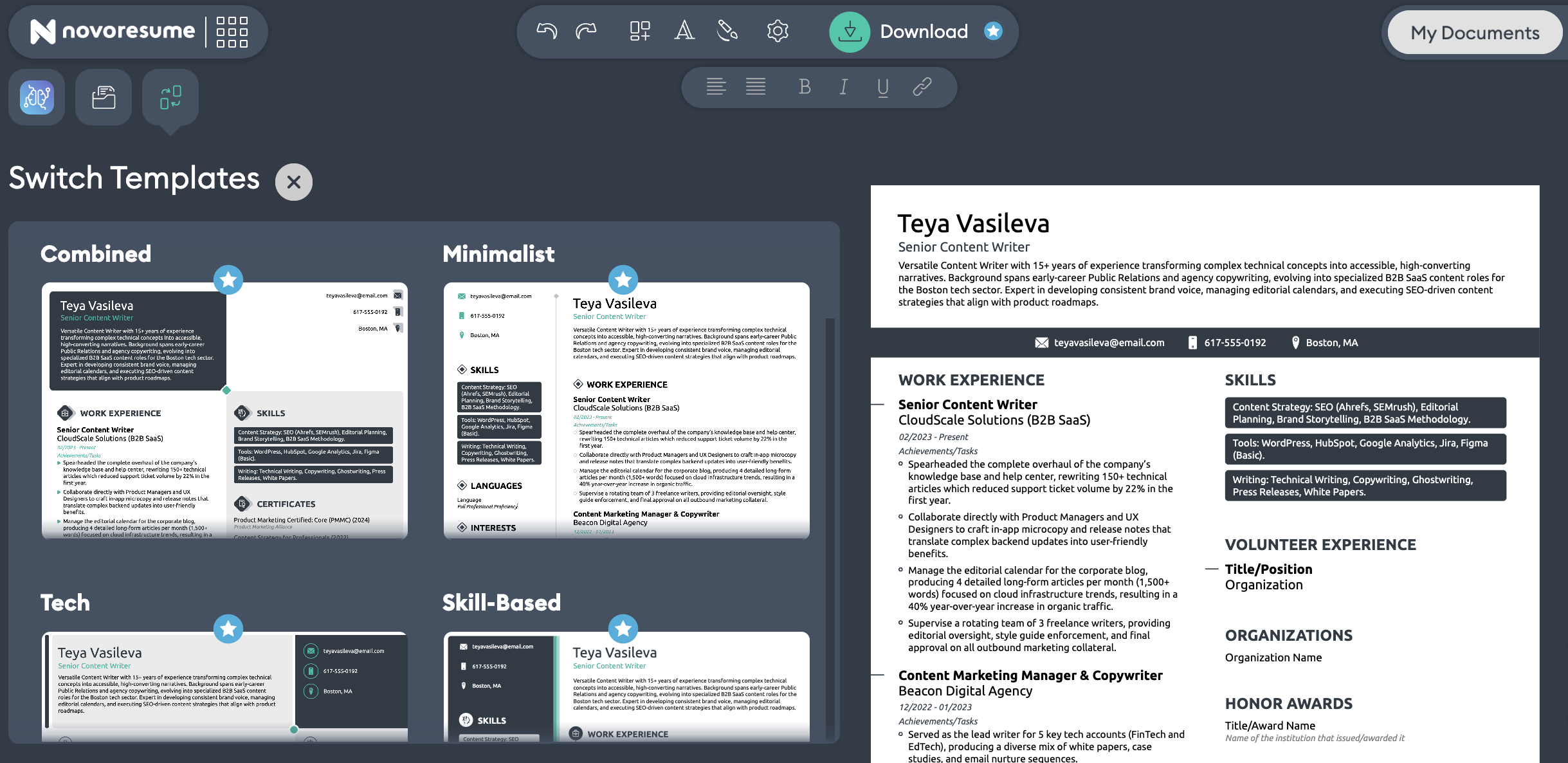
This rigidity leads us directly to the resume templates. Novorésumé offers a selection of 16 visually appealing, modern designs—eight with the Basic and eight with the Premium plan. They’re undeniably sharper than a standard Microsoft Word document, featuring clean typography and effective use of white space.
However, our testing revealed that these templates prioritize safety over strategy.
Template selection based on experience level
Most resume builders let you choose a template based on style (e.g., "Creative," "Corporate"). Novorésumé guides your choice based on your experience level—ranging from Student to Senior to Freelancer.
- Student/Intermediate: Defaults to a one-page limit with specific section ordering (e.g., Education first). This setup works well for early-career users.
- Senior: Offers more space but still enforces specific structural rules regarding section placement.
During my test, I selected "Senior / 5+ Years of Experience," expecting this would unlock a workflow suited for a dense career history.
I didn't realize that experimenting with the layout is a Premium feature. Even as a "Senior" user, I was locked into a fixed structure. When I tried to add a custom section or re-order the flow to tell a better story, I hit a paywall.
Limitations in design variety
While the templates are ATS-friendly and protect the user from making design errors, they suffer from uniformity issues.
- Lack of layout versatility: Since you can’t effectively drag-and-drop sections to create a unique flow on the free plan, most resumes created with Novorésumé share an identical structure.
- Column flexibility: Switching between a double-column and single-column layout isn’t a simple toggle. You’re locked into the column structure of the template you originally selected.
Handling senior-level content
We tested the templates with a senior-level profile containing 15+ years of experience to see how the layout handled text density.
Here’s what we found:
- The strict formatting struggled to accommodate dense bullet points without awkwardly pushing content onto a second page.
- The tool doesn’t automatically adjust margins or font sizes to fit the content. To resolve this, you must opt for Premium to access custom layouts or manually cut text.
Novorésumé’s templates are excellent for first-time job seekers and "standard" careers that fit neatly into boxes. However, for those who need a custom layout to highlight specific strengths (or hide gaps), the lack of flexibility is a significant hurdle unless you upgrade to the paid plan.
Novorésumé customization and download options
Once you’ve selected a template, you naturally want to tweak it to match your personal style. That’s another time where the free plan starts to feel restrictive.
- Fonts and typography: Novorésumé offers 12 professional fonts and three font size options. However, just three of those are available with the Basic plan.
- Color themes: Only the Premium plan unlocks all 74 color themes and the ability to add any of the 20 creative backgrounds (subtle geometric patterns).
- Downloads: PDF is king, even though there’s a plain text option too. Unlike some competitors, Novorésumé doesn’t offer a native "Export to Word" feature for its main builder templates. If you need a .docx file to send to a recruiter who specifically requests it, you can’t generate one here.
On the free plan, you can download a PDF, but it’s strictly limited to one page. If your content spills over, you must either delete text or upgrade to Premium to download the multi-page version.
Novorésumé main features
Beyond the editor and templates, a resume builder needs to do two things: validate that your content is good and protect you from being rejected by applicant tracking systems.
Here’s how Novorésumé handles the basics.
Optimizer
One of Novorésumé’s headline features is the Optimizer. As you build your resume, this tool scans your work and checks for content errors like missing contact information, a summary that’s too short, or an unexplained gap in employment dates.
It’s important to clarify what this tool is not. It’s not a generative AI writer. It won’t rewrite a weak bullet point to make it sound more executive, nor will it suggest specific keywords based on a job description. It will only highlight in red and yellow the areas where you could do better.
Like so:
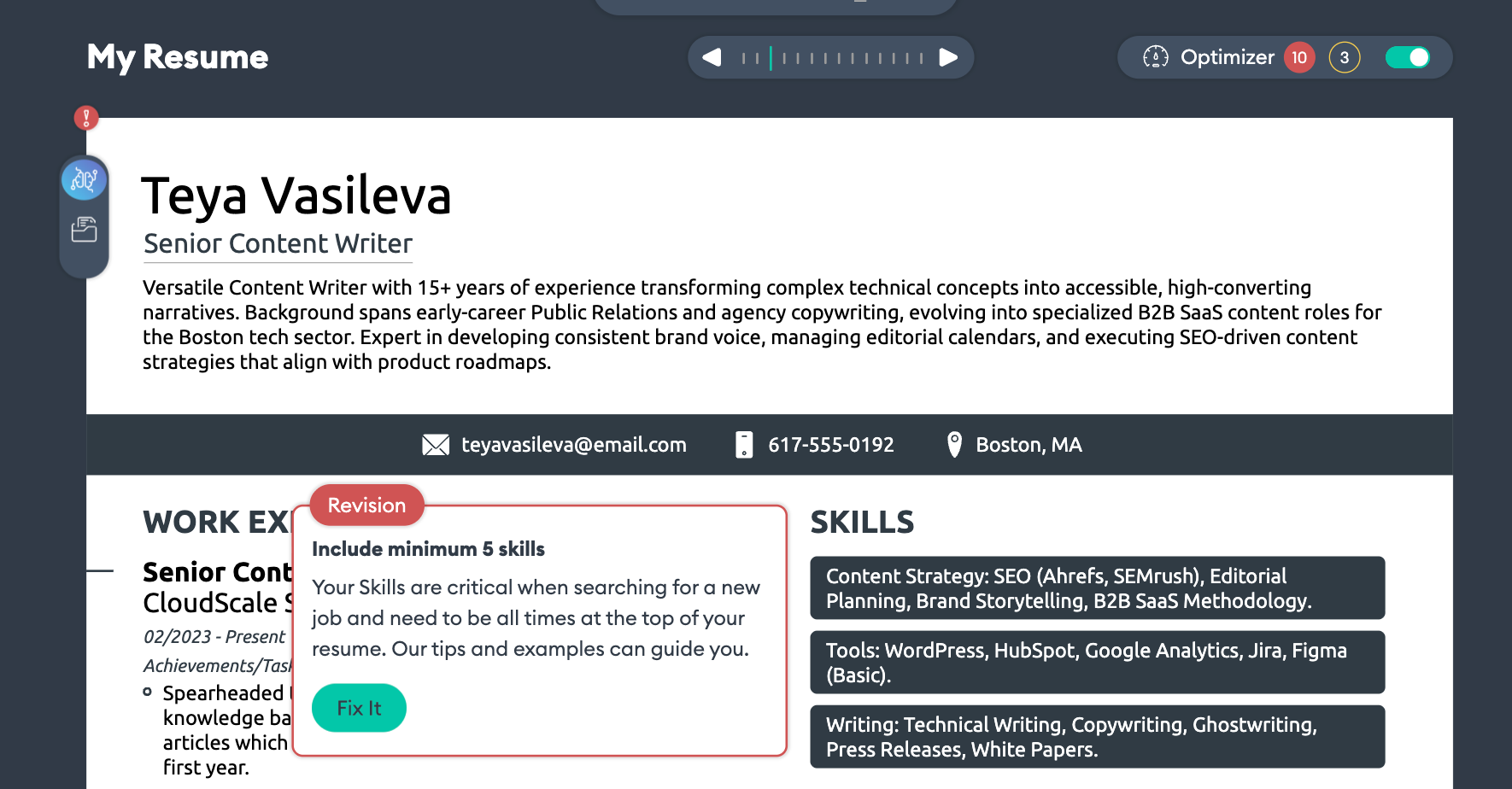
When you click Fix It, the app adds the section, but you do the writing yourself.
It’s an excellent "sanity check" for beginners, ensuring you don't send an incomplete document.
However, if you have writer's block, the Optimizer won’t write the content for you—it will just tell you that you need to write more.
AI Assistant
Novorésumé’s AI Assistant (still in Beta) operates less like a smart editor and more like an integrated chatbot. Instead of automatically tailoring your content based on your job title, it waits for you to drive the conversation with prompts—much like having a generic LLM window open in a sidebar.
When it does respond, the output often reads like educational material rather than ready-to-use resume content. For example, instead of fixing your bullet point, it might explain how to write a better bullet point.
While this crash course in "resume theory" is valuable for students learning the ropes, for most users, it simply adds to the noise. Instead of speeding up the writing process, it risks interrupting your flow with information overload right when you need focus.
ATS Checker
In 2026, hitting "submit" without an ATS check is career suicide. A resume builder isn't complete unless it can promise your document won't get rejected by the recruiter’s software.
Novorésumé addresses this with two layers of protection: the ATS-ready templates (passive protection) and the ATS checker (active protection).
With the latter, you can upload your resume to get a compatibility score.
Here’s what it checks:
- Format and structure
- Keywords and relevance
- Content quality
- Section organization
- Technical elements
You receive a detailed report via email, pinpointing exactly what you’re missing and identifying potential formatting failures.
The scanner serves as a solid diagnostic tool, giving you peace of mind that your file isn't technically "broken." However, take the results with a grain of salt.
Like many AI tools, it’s prone to false positives.
In my testing, the scanner flagged a "critical error," claiming I had listed fewer than five skills and urging me to add more. In reality, I had listed three distinct groups of multiple skills each. The tool simply failed to read the grouped formatting correctly—a reminder that while the machine is fast, it isn't always right.
My Content
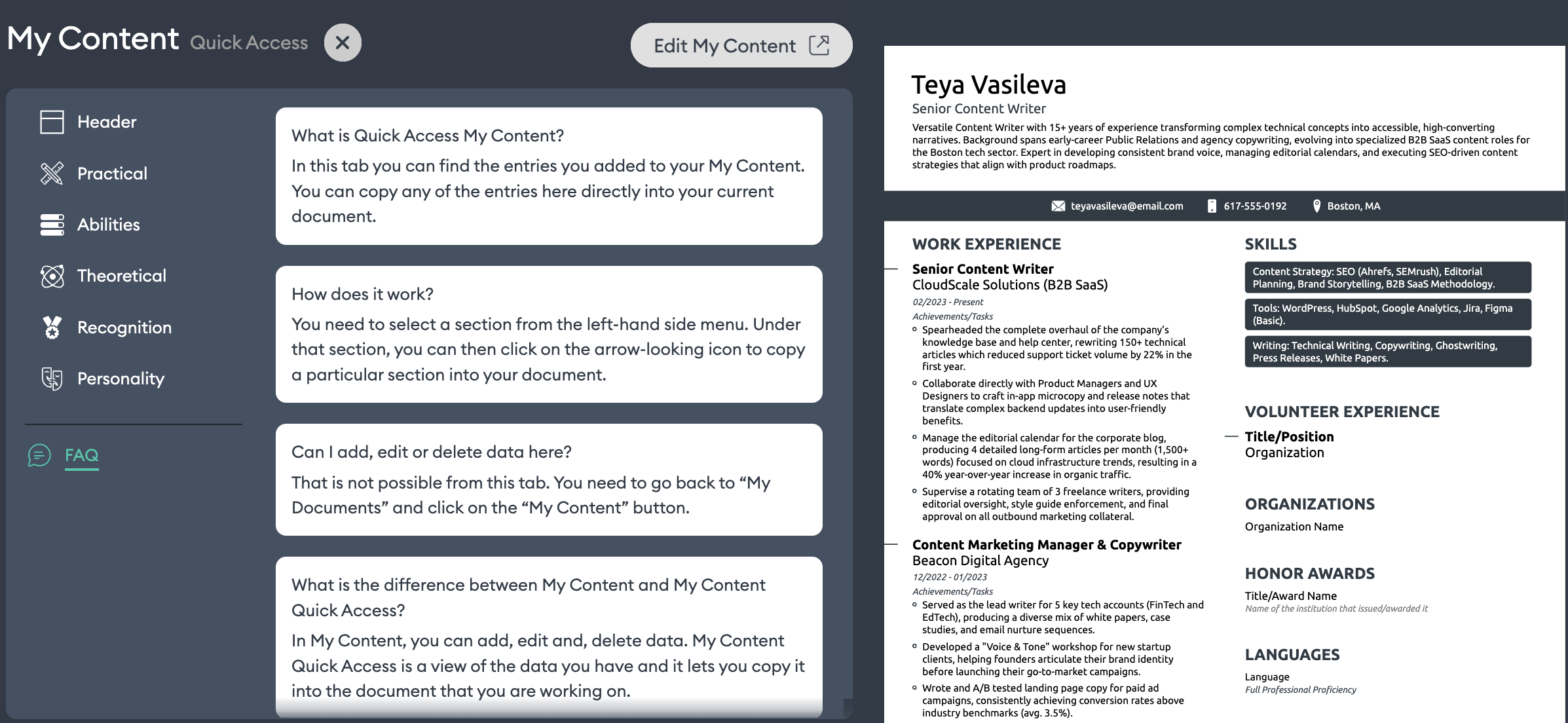
The My Content feature is a centralized repository for your career history. It’s like having a library of all your experience and achievements stored in a separate dashboard.
When building a new resume, you can drag these pre-written blocks onto the page and tailor them to each new job. This allows you to create specific versions of your resume without retyping everything from scratch.
The My Content feature validates the user's need for efficiency. While the layout is a bit rigid, it introduces necessary flexibility into your content strategy, allowing you to adapt quickly without re-entering the information.
However, there’s a somewhat persistent usability issue. When you try to use these in-app features, you’re often met with walls of text and dense instructions on what to do and where to click.
In design, if a feature requires a paragraph of explanation to use, it isn't truly intuitive. This abundance of guidance can paradoxically slow you down, forcing you to read a manual when you just want to build.
Cover Letter Maker
Novorésumé offers 16+ cover letter templates designed to match your resume perfectly. Just like the resume builder, the cover letter tool includes a content optimizer. However, don’t expect it to do the heavy lifting.
The writing part is entirely on you. You can’t upload your resume and automatically generate a tailored draft like you can with some AI-heavy competitors. It requires "good old-fashioned writing," which some users might find challenging if they struggle with self-promotion.
The Cover Letter Maker is explicitly a Premium tool. Even if you have no problem writing the letter yourself, on the free plan, you can only see how it looks. Downloading the final PDF requires an upgrade.
If you’re banking on a 100% free application package, this is where you’ll hit a wall.
Novorésumé pricing
Novorésumé deserves credit for one thing: they aren’t trying to trick you. Unlike many competitors that hide their pricing behind a "trial" that auto-converts into a subscription, Novorésumé displays its costs upfront and doesn’t use recurring billing.
However, the gap between their Free and Premium plans creates a stark divide between who this tool is really for.
Basic plan (free)
This is the plan that made Novorésumé famous. You can sign up, build a resume, and download a PDF without paying a cent.
If you know exactly what you want in terms of structure and content, you’re good. But for someone who’s trying to play around with options, there are significant restrictions, like the one-page limit or the fixed layouts.
The cover letter maker is not included in the free plan, and this is where the "student-friendly" claim hits a snag.
Most entry-level roles require a cover letter to explain your motivation. If you’re a student on a tight budget, upgrading to Premium could be a hurdle. And if you decide not to, you’ll have a beautiful resume, but you’ll have to write and format your cover letter in a separate tool (like Word) that won't visually match.
Premium plan
To unlock multiple pages, custom layouts, and cover letters, you must upgrade.
- 1 month: ~$21.99
- 3 months: ~$39.99
- 12 months: ~$139.99

PRO TIP
At ~$22 for a single month, Novorésumé is on the pricier side for a "do-it-yourself" tool. You’re essentially paying for the design, not the guidance.
If you just need a pretty PDF, it’s a fair price. But if you’re looking for advanced career tools—like AI writing that actually writes, or deep customization features—you might find the features-to-price ratio a bit thin compared to more robust platforms.
Refund policy
This is a critical detail often buried in the fine print. Novorésumé offers a 14-day money-back guarantee, but only for your first upgrade and only if you’re not satisfied with the Premium features. It’s not an "anytime" refund policy, so read the terms carefully.
Novorésumé customer support
When you get stuck, it’s important to know if there is a human on the other end.
Novorésumé offers support via email and a live chat widget. If the bot can't solve your issue, a human usually jumps in within a few hours (or up to a day on weekends).
Our own Customer Support team analyzed the workflow and gave Novorésumé credit for a solid support architecture.
- Smooth handoff: Starting with a chatbot is industry standard, but Novorésumé handles the transition well. The moment the system detects that you’re continuing to type or have a complex query, it automatically assigns a human agent. You aren't trapped in an infinite loop.
- Quality responses: Agents don't just drop a link and leave. They answer the specific question and then point you to relevant self-help resources (often offering a choice between text or video).
- Content gap: The only friction point is the AI’s initial article suggestions. For instance, the bot might suggest a generic "How to use layouts" guide, when the user is really asking, "Why can't I see all sections on the Basic plan?" The automation is good, but the article mapping could be sharper.
Novorésumé user reviews
We’ve analyzed user sentiment across Trustpilot and Reddit threads to see if our experience matches the user reality.
The overwhelming majority of users love the tool and give it 4.5 out of 5 stars. Common praise focuses on the "clean interface" and "ease of use." They frequently mention that it helped them create a professional-looking resume in minutes without struggling with formatting.
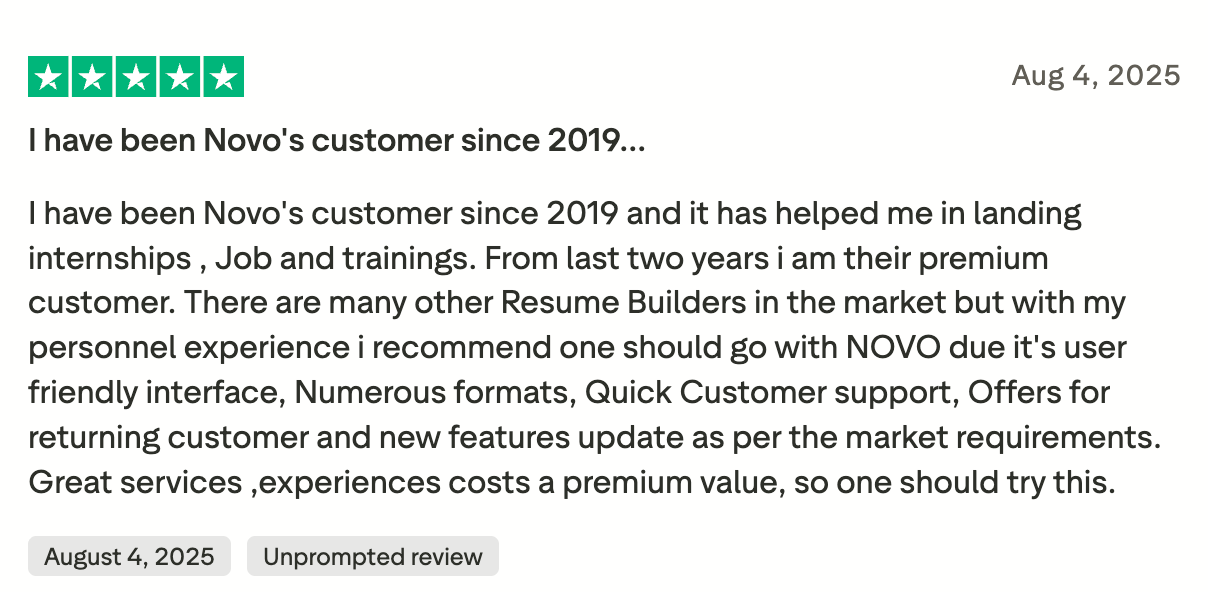
The negative reviews validate the friction points we discovered in our stress test:
- The "free" confusion: Some users felt misled by the "free" marketing, only to realize later that they used a Premium feature (like a specific font or background) and couldn't download their file without paying.
- Rigidity: Experienced users often complain about the inability to customize layouts or the need to have the ATS Checker integrated in the editor.
Here’s what one Reddit user has to say about Novorésumé’s templates:

Novorésumé vs. Enhancv
Novorésumé is a fantastic starting point for students and early-career professionals who need a safe, structured builder. It effectively "safety-proofs" your resume, ensuring you never end up with a broken design.
However, if our stress test resonated with you—if you felt restricted by the rigid grids or found the "Senior" templates too cookie-cutter for your experience—you might need a tool built for customization.
Unlike Novorésumé, Enhancv offers the design freedom to move sections, adjust margins, and craft a layout that fits your career story, not just a pre-set template. If you’re looking for a builder that adapts to your content rather than forcing your content to fit the template, Enhancv is the logical next step.
Why Enhancv is the professional choice:
- Enhancv allows you to drag and drop sections, resize margins, and adjust spacing. You control the flow, not the template.
- While Novorésumé’s free plan strictly caps you at one page, Enhancv’s 7-day free plan lets you handle multi-page resumes without awkward page breaks. You get immediate access to all design tools and templates, allowing you to visualize your full career history—not just a summarized version.
- For serious job seekers, our Quarterly plan unlocks true career firepower. Beyond just removing the branding, you get unlimited section items, a dedicated ATS checker, and sophisticated AI writing assistants (not just spell-checkers). With the ability to manage up to 150 unique resume versions, you can tailor every single application without hitting a "limit" wall.
Conclusion
Overall, Novorésumé is excellent for starting a resume quickly, especially if you’re early in your career. However, if you’re a seasoned professional who needs deep customization or long-term access to edits, you’ll need to upgrade to access all the functionalities.
Make one that's truly you.